Best Music Player for Live Recordings on Mac
You have a folder of live recordings. Maybe a few folders. Maybe a few hundred. Grateful Dead from the '70s, Phish from the '90s, Billy Strings from last month. Some came from Archive.org, some from friends, some from years of trading. You open them in Apple Music or VLC and immediately hit the same problems: no set breaks, no source information, no way to tell a soundboard from an audience tape, and gaps between tracks that break every segue.
General-purpose music players were built for studio albums. Three-minute songs with clean metadata from a database somewhere. Live recordings follow different rules, and most players have no idea what to do with them.
What a live recording player actually needs
If you have spent time collecting and organizing live recordings, you already know the vocabulary. A good player needs to understand it too.
Set breaks. A live show is not a flat list of tracks. It has structure. Set I, Set II, Encore. A player that understands sets can display a show the way it was performed, with clear breaks between sections. When you are looking at a three-set Dead show from 1977, the difference between a flat tracklist and a structured setlist is the difference between reading a paragraph and reading a table of contents.
Source types. Not all recordings are equal. A soundboard (SBD) pulls from the mixing console. An audience tape (AUD) captures the room, the crowd, the acoustics. A matrix blends both. Knowing which type you are listening to changes how you evaluate the recording. A player that tags these automatically saves you from guessing.
Taper notes.The person who recorded the show often includes notes about their gear, their position in the venue, any issues during the capture. These notes are part of the recording's history. A player that surfaces them gives you context that changes how you listen.
Gapless playback.This is non-negotiable. When “Also Sprach Zarathustra” flows into “Truckin'” at Winterland 1973, any gap between those tracks destroys the recording. The transition is the performance. A player that inserts silence between tracks is breaking the show.
Format support. Live recordings come in everything. FLAC is the standard for lossless trading. But you will also encounter WAV, AIFF, SHN (Shorten), DSD from high-end transfers, and MP3 or AAC from older collections. A player that cannot handle FLAC natively is not a serious option for this use case.
Why general-purpose players fall short
Apple Music does not know what a set break is. It will display a live Dead show as 24 untitled tracks with no source information and no way to distinguish it from a studio record. If your FLAC files lack embedded metadata, Apple Music will not even try.
VLC plays everything, but it is a video player with audio support, not a music player. No library management, no source type awareness, no way to browse by venue or date. You are dragging folders into a window every time.
Audiophile players like Roon and Audirvana solve the audio quality problem. Bit-perfect playback, exclusive mode, high-resolution format support. But they were built for studio album collections. They have no concept of taper notes or source types, no venue explorer, no way to search across Archive.org and Phish.in alongside your local files. They treat live recordings the way they treat everything else, which means ignoring everything that makes live recordings different.
What Showboard does differently
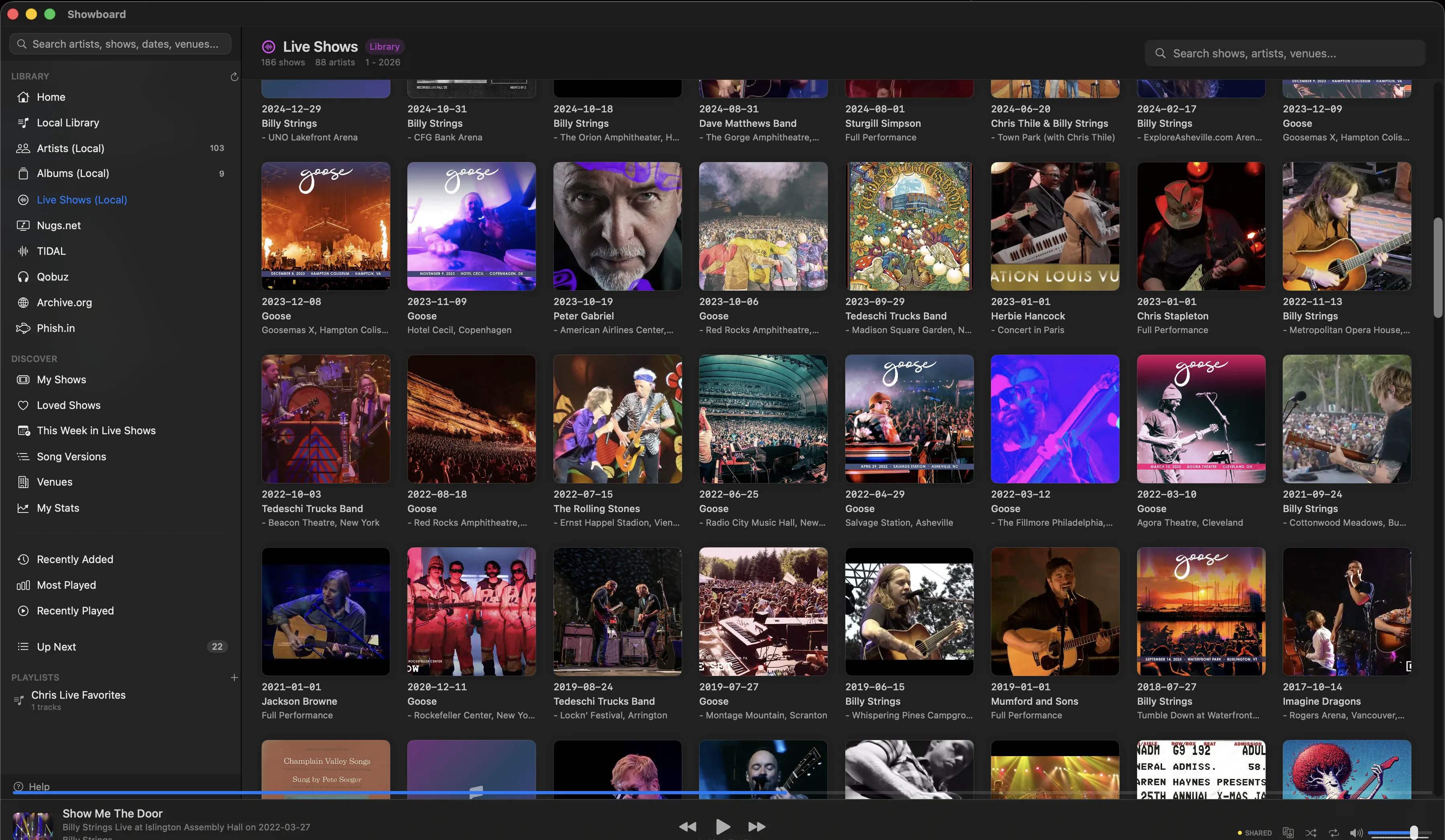
Showboard is a native macOS music player built specifically for this. Live concert recordings are first-class citizens, not afterthoughts crammed into a framework designed for studio albums.
Six sources in one search. Your local files, nugs.net, TIDAL, Qobuz, Archive.org, and Phish.in all appear in a single library. Search for Goose 2024-09-14 at Red Rocks and see every available recording across every source. The nugs.net SBD in 24-bit FLAC, the Archive.org audience tape, your own recording from the lawn. One search, one list.
Set breaks and source types. Every show displays its structure. Set I, Set II, Encore. Source type badges (SBD, AUD, Matrix) appear on every recording so you know what you are hearing before you press play. Taper notes are one tap away.
Venue Explorer. Browse by venue. See every show at The Gorge, MSG, Red Rocks across all six sources. If you were there, find the recording. If you were not, find out what you missed.
Concert diary. Log the shows you have attended. Showboard automatically finds every recording of that show across all sources. Rate them, add notes, build a timeline of your live music life.
Song Versions.Pick a song and see every performance across every source. Compare the 1977 Cornell “Scarlet Begonias” with the 2023 Dead & Company version. Different eras, different recordings, same song.

Audio quality without compromise
Showboard uses CoreAudio HAL exclusive mode for bit-perfect playback. Audio goes straight from the file to your DAC with no macOS mixer in the way. Sample rate switches automatically to match each recording. If a FLAC is 96kHz/24-bit, your DAC gets 96kHz/24-bit. No resampling, no processing, no guessing.
Gapless playback works across every source. Local files, nugs.net streams, Archive.org downloads. The transition from one track to the next is continuous, the way the band played it.
Format support covers everything you will encounter: FLAC up to 384kHz/32-bit, DSD (DSD64, DSD128, DSD256), ALAC, WAV, AIFF, WavPack, MP3, AAC, and OGG. If someone sent it to you, Showboard plays it.
$39, not $13 a month
Showboard is $39 one-time. 14-day free trial. No subscription, no annual renewal. Every future update is included. Compare that to Roon at $13/month or Audirvana at $109 with an annual renewal, and the math is simple. Download it, try it for two weeks, and see if your live recordings have ever sounded this organized.
Related posts
Try Showboard free for 14 days.
Download for Mac