How to Organize 20 Years of Live Recordings
You have a drive. Maybe two. FLACs from etree, SHNs you converted years ago, nugs downloads mixed in with audience recordings a friend handed you on a USB stick after a show. It's organized in the sense that you know roughly where things are. You remember that the Cornell '77 show is in the Grateful Dead folder, and the Phish NYE run is somewhere under 2023. But it's not searchable. It's not browsable. It's a collection held together by memory and folder names.
That's fine. It worked for a long time. But at some point the collection crosses a threshold where memory alone isn't enough. You can't remember if you have the Charlie Miller board or the Betty Board of 1977-05-08. You know you grabbed a matrix of Blossom 2023 but you're not sure which one. The collection outgrew the system.
The etree naming convention
Most live recordings in circulation follow a naming convention that the trading community settled on decades ago. If you've ever downloaded from etree or the Live Music Archive, you've seen it:
gd1977-05-08.sbd.miller.32926.sbeok.shnf
Each piece carries meaning. gd is the artist (Grateful Dead). 1977-05-08 is the date (that Cornell show). sbd means soundboard recording. miller is the taper or transfer (Charlie Miller). 32926 is the etree source ID. sbeok means it passed sector boundary error checks. shnf tells you it's in SHN format (converted from the original).
This convention is dense and efficient. It encodes everything you need to know about a recording into a single folder name. It's been the standard for over twenty years. If your collection follows it, you already have better metadata than most people realize. The problem is that no music player knows how to read it.
Why most players can't handle this
iTunes expects Artist, Album, Track Number, Song Title. Apple Music expects the same. Spotify doesn't even deal with local files in any meaningful way. A folder named ph2023-12-31.sbd.hdcd.flac16 means nothing to any of them. Import it into Apple Music and you get "Unknown Artist" with 25 tracks named Track 01. Or worse, it tries to "match" your audience recording of Phish at MSG to a studio album and replaces it entirely.
VLC will play the files. It always does. But VLC is a player, not a library. You can't browse by date, filter by source type, or see which venues you have the most recordings from.
Foobar2000 is the closest thing to a real solution. It handles FLACs and SHNs, supports custom columns and tagging, and you can configure it to parse folder names with enough effort. But "enough effort" is the key phrase. You're writing title formatting scripts and building custom playlists to approximate what should be built-in behavior for a live music library.
The fundamental issue: these players were designed for studio albums. Live recordings don't fit the model. A show isn't an album. A taper isn't an artist. A source type isn't a genre. Forcing live recordings into that structure means losing the very information that matters most.
What Showboard does differently
Point it at the folder. That's it.
Showboard reads etree-style folder names natively. It parses the dates, identifies artists from the abbreviation prefixes, detects source types (SBD, AUD, MTX, SBD/AUD matrix), reads info.txt and txt files that travel with recordings, and organizes everything as live shows. No tagging required. No renaming. Your existing folder structure stays exactly as it is.
I pointed Showboard at my Grateful Dead folder. 847 shows. Organized by date, venue, and source type in about 90 seconds. Shows I forgot I had. Multiple sources for the same date, clearly labeled. Every info.txt parsed and searchable. The taper notes, the lineage, the transfer details. All there, all readable, without touching a single file.
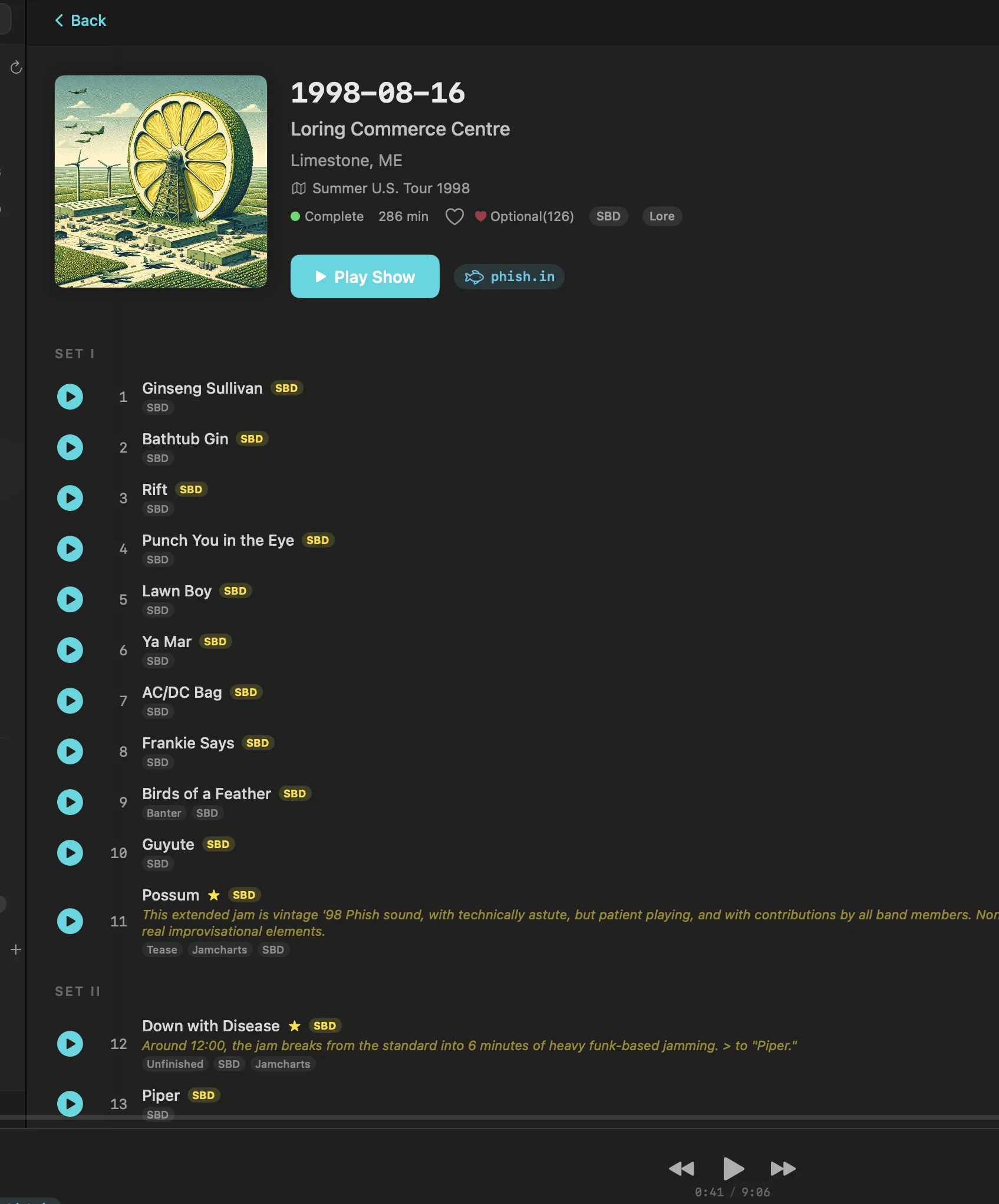
Showboard also pulls in recordings from nugs.net, Archive.org, and Phish.in alongside your local files. So if you have 1977-05-08 locally and there are three more sources on Archive.org, they all appear under the same date. One unified view of every recording you have access to, whether it lives on your drive or on a server.
Tips if you want to clean things up
Your existing structure is probably fine. But if you want to tighten things up, here's what matters:
Keep the etree naming convention. It's proven. Twenty-plus years of community consensus is worth more than any personal system you'll invent on a Saturday afternoon.
Store info.txt files alongside the audio. These files contain taper notes, recording lineage, equipment lists, and sometimes setlists. They're the liner notes of live recordings. Showboard reads them. Keep them.
Use FLAC over SHN when possible. SHN was the standard for a long time, but FLAC supports embedded metadata, is more widely compatible, and compresses slightly better. If you're converting, tools like shntool and ffmpeg handle batch conversion cleanly.
Keep one folder per source. If you have both an audience recording and a soundboard of the same show, they should be separate folders with distinct names. The source type in the folder name handles this naturally.
Date-based organization works better than artist-first for live music. A folder structure like Grateful Dead/gd1977-05-08.sbd.miller.32926.sbeok.shnf/ gives you both. The top-level artist folder for broad browsing, the date-first folder name for precision.
Network drives and NAS
If your collection lives on a NAS (and at 4TB, it probably does), Showboard works with mounted network shares. Mount the drive in Finder, point Showboard at it, and the library builds from there. Changes are detected automatically. Add a new show to the NAS from your laptop and it appears in Showboard without a manual rescan.
This matters because large collections tend to live on dedicated hardware. A Synology in the closet, a Drobo on the shelf, a Mac Mini running as a headless server. Showboard doesn't care where the files physically live. If macOS can see the volume, Showboard can read it.
The system that already works
The best organization system is the one that works with what you already have. You don't need to retag thousands of files. You don't need to rename folders to fit someone else's schema. Twenty years of folder names are twenty years of a system that worked. The dates are there. The source types are there. The taper credits are there.
Showboard reads it as-is. Your collection was already organized. It just needed a player that understood the format.
Related posts
Try Showboard free for 14 days.
Download for Mac